Salesforce

gopost® Package Pickup

« Go Back

Information

 
Article Number000007960
Customer Information

When is the latest I can request a gopost® delivery online so that it is delivered the following day?

What are gopost® parcel lockers?How does the gopost® Package Pickup option work?
How long do I have before I have to pick up my package at the gopost® unit?gopost®Redelivery - The Basics
USPS® Smart Locker  

*Added 3/16/2021* - Has the gopost® form been changed?

Yes. The PS Form 3849G will be retired from production and will be replaced with the February 2021 version of PS Form 3849 for all customers. Letter carriers will be required to indicate on the updated forms if a customer is eligible to have their items redelivered to a gopost® parcel locker by checking "Parcel Locker Eligible".

What is the gopost® Package Pickup option?

When you receive our notice of a missed package delivery, the gopost® Package Pickup option allows you to pick up the package from a local gopost® self-service parcel locker unit. Gopost® units are available for longer hours than our window hours and make it easier to get your packages on your schedule.

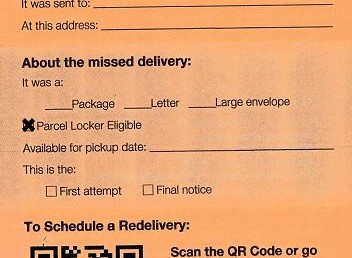
Since not all packages are eligible for delivery through gopost®, we'll check a box for "Parcel Locker Eligible" on the Redelivery form (PS Form 3849 Redelivery Notice) if the package is eligible.

You do not need to be a registered gopost user to utilize this option.

Image of a section of the front of the PS Form 3849, Redelivery Notice, the Feb. 2021 version. The focus is the "About the missed delivery:" section. Lines are available to check to indicate if the missed delivery was a "Package", "Letter", or "Large Envelope". On the next line, an "X" is over the checkbox next to "Parcel Locker Eligible". The next line has "Available for pickup date:" with a line next to it. The final lines has a checkbox next to "First attempt" and "Final notice".


Can I select the gopost® unit for the gopost® Package Pick Up Option?

No. We provide the specific gopost location associated with your delivery address directly on the Redelivery notice form and in our email/text notifications to you. In most cases, this will be the closest gopost unit to your delivery address.

For the option of choosing any gopost unit for deliveries (as well as shipping), you may wish to become a registered gopost user. Just visit https://gopost.usps.com/go to learn more and signup! Further information is also available at the article gopost®.
 

What if my 3849 form is not checked "Parcel Locker Eligible"?

Your package cannot be loaded into a gopost unit. We may have determined that the package is too large to fit in a gopost parcel locker. Or the piece may be ineligible due to the services requested by the sender.

Refer to items marked on the front of your 3849 form to determine the mail piece type. Follow instructions on the form for options other than gopost. See Redelivery - The Basics for further information.
 

When is the latest I can request a gopost® delivery online so that it is delivered the following day?

In most cases, if you make your request before 12AM, your package will be available at gopost the following day.


Where can I find the hours of availability for the gopost® unit assigned to my delivery address?

Many of the gopost units are accessible 24/7. However, please refer to hours listed on the Redelivery notice form for any exceptions.

Back to top icon

What are gopost® parcel lockers?

Gopost units are automated, secured, self-service parcel lockers placed in convenient locations. In addition to using the gopost Missed Delivery Pickup option, you may at some point choose to become a registered gopost customer - for both receiving and shipping of packages. It's FREE. Just visit https://gopost.usps.com/go to learn more and signup!
 

How does the gopost® Package Pickup option work?

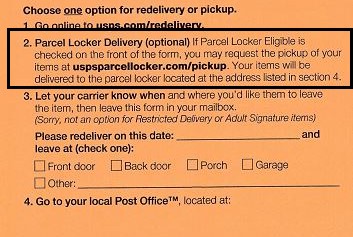
If we missed you when we tried to deliver your package, we will leave a Redelivery notice (PS Form 3849 Redelivery Notice) containing options for redelivery and pickup.

If the "Parcel Locker Eligible" option is checked on the form and you are interested in retrieving your package via gopost, first visit https://gopost.usps.com/go/EPLGPSearchAction.action.

  1. At the website, provide your original delivery address, contact preferences, and delivery information number found on the notice slip left by your carrier.
  2. When your package has been loaded into gopost, you will receive a unique passcode and a reminder of the gopost unit location via email or text.
  3. Visit the gopost unit, enter your unique passcode from the email/text, and retrieve your package.

If your package requires a signature, you will be instructed to sign your name directly on the gopost kiosk screen using your finger before the locker will unlock. This service is only available in areas supported by gopost.

Instructions to guide you to the website are also on the Redelivery form.

How long do I have before I have to pick up my package at the gopost® unit?

Packages will be kept in the gopost unit for the normal Post Office hold period.
 

What size packages can be received via gopost®?

gopost unit lockers will fit packages up to 12"W x 15"D x 18½"H.


What types of items cannot be received via gopost® at this time?

Your Redelivery notice form will indicate if your package is eligible for gopost. Ineligible item include:

  • Letters or flat-sized envelopes less than ¾" thick (other than Priority Mail or Priority Mail Express)
  • Packages larger than the maximum size (12"W x 15"D x 18½"H)
  • Packages received with the following Extra Services: 
    • Certified Mail®
    • Return Receipt (hardcopy "blue card")
    • Collect On Delivery (COD)
    • Registered Mail®
    • Adult Signature
    • Restricted Delivery
    • Special Handling

Prohibited items may be returned to sender.

For packages too large for gopost, USPS will hold the package at a nearby Post Office and will send you the Post Office's address via email/text.

Inbound packages that require customs fees cannot be received via the gopost unit. International Extra Services that cannot be included are Restricted Delivery, Registered Mail, and Return Receipt.


For information or assistance:

For the most up-to-date information and usage terms, you may also call 1-USPS-MY GOPOST (1-877-769-4676).

Back to top icon

Customer Information 2

How do I order an item and have it shipped to gopost®?How do I ship a package from gopost®?What types of packages can be received or shipped via gopost®?
How do I register and get authenticated for gopost®?gopost® Package PickupUSPS® Smart Locker


General Information

What is gopost®?

gopost® is a convenient way to receive and ship packages, only from the United States Postal Service®. gopost® units are automated, secured, self-service parcel lockers placed in convenient locations where you can pick up or ship packages at your convenience. And at no additional cost to you.

For more information on what to do when you receive a notice of a missed package delivery, see gopost® Package Pickup.

What are gopost® parcel lockers?

Gopost units are automated, secured, self-service parcel lockers placed in convenient locations. In addition to using the gopost Missed Delivery Pickup option, you may at some point choose to become a registered gopost customer - for both receiving and shipping of packages. It's FREE. Just visit https://gopost.usps.com/go to learn more and signup!
 

When can you use gopost®?

Anytime. You can access gopost units 24 hours a day, 7 days a week so you can pick up or ship out packages when it suits your schedule without having to go to the Post Office—as long as the gopost unit is operational and available to the public.
 

Where can I find the hours of availability for the gopost® unit assigned to my delivery address?

Many of the gopost units are accessible 24/7. However, please refer to hours listed on the Redelivery notice form for any exceptions.

Where are gopost® units?

gopost units are located at convenient locations to accommodate your busy lifestyle. The Postal Service is installing units near certain Post Offices™, grocery stores, pharmacies, transportation hubs, shopping centers and more. Find gopost locations.


How does gopost® work?

Each gopost unit contains dozens of individual parcel lockers that can be used to receive or ship packages. Once you register for gopost, you will receive an account number/access card and PIN so you can access the unit. You will not be assigned a specific parcel locker; rather, packages are placed in available lockers that may accommodate the size of your package.

If you use the gopost unit as your shipping address, your packages will be delivered there. You can also use the gopost unit to ship your prepaid packages. Once you register and begin using gopost units, you will receive communication through email or text notifications. To help ensure you receive emails properly, please check your mail filter so that emails from the U.S. Postal Service, USPS.com and gopost are allowed.


Do I have to use gopost® for all my packages?

You are not required to use gopost for all your packages. You can use gopost for specific incoming packages or for as many incoming packages as you wish. You have control over where you want to receive your packages based on the address you provide the shipper—home, work or gopost.


For information or assistance:

For the most up-to-date information and usage terms, you may also call 1-USPS-MY GOPOST (1-877-769-4676).


Mail Classes and Packages Eligible for gopost

What types of packages can be received or shipped via gopost®?

While we prefer you choose the U.S. Postal Service for your shipping needs, we understand that many online merchants do not offer a clear choice of shippers. For receiving packages using gopost, we are partnering with key shipping competitors to enable your online orders to be delivered to your preferred gopost unit address. For shipping packages using gopost, USPS package services are required.

USPS® package mail classes allowed include:

  1. Any Priority Mail® mailpiece  
  2. Any Priority Mail Express® mailpiece
  3. Other package types that are at least 3/4" thick

Postal Service mailing regulations apply. Our gopost units also accept your Return Merchandise Labels to make your returns even easier.

There are three parcel locker sizes at each gopost unit to accommodate various size packages:

  1. Large: up to 12"W x 15"D x 18-1/2"H (maximum size)
  2. Medium: up to 12"W x 15"D x 6-3/4"H
  3. Small: up to 12"W x 15"D x 3"H

Our National Address Management Service recognizes gopost addresses and formats as acceptable for addressing packages. If the sender will not accept the gopost unit address, please contact the sender and discuss this with them.

Back to top icon

What size packages can be received via gopost®?

gopost unit lockers will fit packages up to 12"W x 15"D x 18½"H.


What types of items cannot be received via gopost® at this time?

Your Redelivery notice form will indicate if your package is eligible for gopost. Ineligible item include:

  • Letters or flat-sized envelopes less than ¾" thick (other than Priority Mail or Priority Mail Express)
  • Packages larger than the maximum size (12"W x 15"D x 18½"H)
  • Packages received with the following Extra Services: 
    • Certified Mail®
    • Return Receipt (hardcopy "blue card")
    • Collect On Delivery (COD)
    • Registered Mail®
    • Adult Signature
    • Restricted Delivery
    • Special Handling

Prohibited items may be returned to sender.

For packages too large for gopost, USPS will hold the package at a nearby Post Office and will send you the Post Office's address via email/text.

Inbound packages that require customs fees cannot be received via the gopost unit. International Extra Services that cannot be included are Restricted Delivery, Registered Mail, and Return Receipt.


What type of domestic packages cannot be received or shipped via gopost® at this time?

  1. Letters or flat-sized envelopes less than 3/4" thick (other than Priority or Priority Mail Express)
  2. Packages larger than the maximum size (12"W x 15"D x 18-1/2"H)
  3. Packages received/shipped with the following Extra Services: 
    • Certified Mail®
    • Return Receipt (hardcopy "green card")
    • Collect On Delivery (COD)
    • Registered® Mail
    • Adult Signature
    • Restricted Delivery
    • Special Handling

    Prohibited items may be returned to sender.

    For packages too large for gopost, USPS will hold the package at a nearby Post Office and will send you the Post Office's address via email/text.
     

    What type of international packages can be received or shipped via gopost®?

    Inbound packages that do not require customs fees can be received via the gopost unit. International Extra Services that cannot be included are Restricted Delivery, Registered Mail, and Return Receipt.

    Outbound international and APO/FPO packages cannot be shipped via the gopost unit at this time.
    Back to top icon


    Registering for gopost


    How do I register and get authenticated for gopost®?

    To register and get authenticated for gopost, follow these quick and easy steps:

    • Go to gopost.usps.com/go and click the Register button. To register for gopost, you need to sign in or sign up for a USPS.com account (it's free).
    • Enter all required information for USPS.com and gopost - including a Personal Identification Number (PIN) and your preferred authentication option. (For details, see below.)
    • You'll receive an email confirming that you are pre-registered for gopost with your gopost account number. You should receive your gopost card and packet in the mail within 7-10 days. 

    The next step for completing your registration is authentication. You may select one of two options:

    • Authenticate at gopost unit:

    This option allows you to start using gopost immediately to receive packages - even before you receive your gopost card and packet in the mail.

    To authenticate your account at a gopost unit, simply scan your Driver's License or state-issued ID card on the screen display at a gopost unit. (You can do this when you log in to pick up your first package.) Once your ID is accepted, you will receive an email confirming that you have a fully activated account and you may then use gopost to ship and receive packages.

    For more information, see below.

    • Authenticate at Post Office

    If you select this option, you must wait until you have received the gopost packet in the mail. Once you authenticate at a Post Office, you will receive an email confirming that your account is fully activated for sending or receiving packages.

    To authenticate your account at a Post Office, take the completed Authentication Sheet and gopost card you received in the mail to a location listed at https://gopost.usps.com/go/EPLGPSearchAction.action. Show a government-issued picture ID. We will then send you an email confirming that you have a fully activated account.

    Your new gopost account and card is for you only. Like a credit or debit card, only you should use your gopost card and assigned PIN. Other adults (18 or over) interested in using gopost may register free of charge for their own account, card, and PIN.

    NOTE: For gopost, you must register as an individual even if you are a business user; gopost accounts are issued in the names of individuals, not companies.

    Back to top icon


    How do I make changes to my gopost® account?

    To make changes to your gopost account, go to gopost.usps.com/go and click Register or edit your account. Once you sign in, you make changes to your account information.
     

    Can I order a replacement gopost® card?

    Yes. To order a replacement card, go to gopost.usps.com/go and click Register or edit your account. Once you sign in, you can select "Replace Lost Card" under Special Requests and request a new gopost card.
     

    What are the gopost® registration requirements?

    When you register for gopost, you specify notification and authentication options and are required to select a Personal Identification Number (PIN). The USPS requires customer authentication to meet security requirements.
     

    How do I authenticate my account at the gopost® unit?

    If you would like to start receiving packages through gopost right away and you prefer to authenticate at the gopost unit, select this option during the registration process at gopost.usps.com/go. If you select this option, you'll need to provide your Driver's License or state-issued ID number during the online registration process and your gopost account will be temporarily authorized.

    To complete the authentication step, simply scan the barcode on the back of your ID at the gopost unit. If the information matches what you provided online, you will receive an email that your temporary account has been fully activated and you may send and receive packages once your account is activated.

    Important: Your temporary gopost unit account authorization allows you to log into the gopost unit up to three (3) times to pick up packages that you have sent to the unit. After that, if you have not received confirmation that your account is activated, your account will be suspended and you must authenticate your account at a Post Office location listed at https://gopost.usps.com/go/EPLAction!locations.action.


    Requesting Redelivery through gopost

    What is the gopost® Package Pickup option?

    When you receive our notice of a missed package delivery, the gopost® Package Pickup option allows you to pick up the package from a local gopost® self-service parcel locker unit. Gopost® units are available for longer hours than our window hours and make it easier to get your packages on your schedule.

    Since not all packages are eligible for delivery through gopost®, we'll check a box for "Parcel Locker Eligible" on the Redelivery form (PS Form 3849 Redelivery Notice) if the package is eligible.

    You do not need to be a registered gopost user to utilize this option.

    Image of a section of the front of the PS Form 3849, Redelivery Notice, the Feb. 2021 version. The focus is the "About the missed delivery:" section. Lines are available to check to indicate if the missed delivery was a "Package", "Letter", or "Large Envelope". On the next line, an "X" is over the checkbox next to "Parcel Locker Eligible". The next line has "Available for pickup date:" with a line next to it. The final lines has a checkbox next to "First attempt" and "Final notice".

    What if my 3849 form is not checked "Parcel Locker Eligible"?

    Your package cannot be loaded into a gopost unit. We may have determined that the package is too large to fit in a gopost parcel locker. Or the piece may be ineligible due to the services requested by the sender.

    Refer to items marked on the front of your 3849 form to determine the mail piece type. Follow instructions on the form for options other than gopost. See Redelivery - The Basics for further information.

    How does the gopost® Package Pickup option work?

    If we missed you when we tried to deliver your package, we will leave a Redelivery notice (PS Form 3849 Redelivery Notice) containing options for redelivery and pickup.

    If the "Parcel Locker Eligible" option is checked on the form and you are interested in retrieving your package via gopost, first visit https://gopost.usps.com/go/EPLGPSearchAction.action.

    1. At the website, provide your original delivery address, contact preferences, and delivery information number found on the notice slip left by your carrier.
    2. When your package has been loaded into gopost, you will receive a unique passcode and a reminder of the gopost unit location via email or text.
    3. Visit the gopost unit, enter your unique passcode from the email/text, and retrieve your package.

    If your package requires a signature, you will be instructed to sign your name directly on the gopost kiosk screen using your finger before the locker will unlock. This service is only available in areas supported by gopost.

    Instructions to guide you to the website are also on the Redelivery form.


    Can I select the gopost® unit for the gopost® Package Pick Up Option?

    No. We provide the specific gopost location associated with your delivery address directly on the Redelivery notice form and in our email/text notifications to you. In most cases, this will be the closest gopost unit to your delivery address.

    For the option of choosing any gopost unit for deliveries (as well as shipping), you may wish to become a registered gopost user. Just visit https://gopost.usps.com/go to learn more and signup! Further information is also available at the article gopost®.


    Receiving shipments through gopost


    How do I order an item and have it shipped to gopost®?

    Follow these steps when ordering an item:

    1. Determine the gopost address of the unit where you would like to pick-up your shipment. The gopost address contains the gopost unit number followed by the word "gopost". Find gopost locations.
    2. Place and complete your order from your desired merchant (e.g., via online, telephone). If the merchant offers a choice, select the U.S. Postal Service as your shipper. If not, we are partnering with key shipping competitors to assure your packages are delivered successfully to our gopost units in most instances.


    When asked for the shipping address, use your name, gopost account number and the address of the gopost unit (as shown in example below) where you want to receive your shipment. You must include your gopost account number so that we can notify you when the package arrives. Do not include the gopost location street address number and street name in the address.

    here's how to address a package for gopost: your name; your gopost unit number, e.g. 4505 gopost, your gopost account number, e.g. XXXXXXX; City, State, ZIP Code TM, e.g. Anywhere, VA 12345-2345

    When USPS® delivers your package to a gopost unit, you will receive an email or text notification that you have a package to pick up. Simply visit the gopost unit to pick up your package. If a properly-sized parcel locker is not immediately available for your package, you will be notified that it will soon be available for pick-up at the gopost unit. Your package will be given the highest delivery priority for the next available locker of the proper size.

    Remember: You must be registered to use the gopost service.

    Back to top icon

    How will I know my package has been delivered to a gopost® unit?

    When your package is delivered to the gopost unit, you will receive an email and/or text message (you specify preference).
     

    How do I pick up my package after I am notified that it has been delivered?

    To pick up a package at a gopost unit:

    1. Scan your gopost card and enter your PIN on the gopost user screen; the screen will display the parcel locker where your package was delivered and the parcel locker will light up and automatically unlock.*
    2. Open the locker and remove your package. The locker will shut and lock automatically only after it is empty.
    3. If you requested a receipt, collect the paper receipt from the unit. Once you have removed your package, you will automatically receive an electronic receipt via email or text.(*). If your package requires a signature, you will be instructed to sign your name directly on the screen using your finger before the locker will unlock.

    *You have a maximum of 15 days to pick up your package at a gopost unit (exception: 5 days for Priority Mail Express®). After 15 days, the package will be returned to the sender. International packages will be removed from the unit after 15 days and taken to a nearby post office. You will be notified of the post office's address. After 15 days at the post office, the package will be returned to sender.


    How long do I have before I have to pick up my package at the gopost® unit?

    Packages will be kept in the gopost unit for the normal Post Office hold period.
     

    Can I use gopost® to receive packages from friends and family?

    Yes. Just make sure you ask the sender to use the correct address format including your account number.

    Back to top icon

    Shipping your packages through gopost


    How do I ship a package?

    Your package must have a label that indicates that postage has been prepaid with a barcode that enables tracking. Acceptable labels include: Click-N-Ship®, PC Postage®, and merchant-paid Return Services. The gopost units cannot currently dispense postage.

    To ship a package:

    1. Visit any convenient gopost unit to send a pre-paid barcoded package. Find gopost locations.
    2. Scan your gopost card and enter your PIN on the gopost screen.
    3. Select "Ship Packages".
    4. Scan the USPS® barcode label on the front of the package using the unit's barcode scanner and follow instructions on the screen to complete your transaction.
    5. If you requested a receipt, collect your paper receipt from the unit. You will automatically receive an electronic receipt via email or text.


    Customer Information 3

    How do I order an item and have it shipped to gopost®?How do I ship a package from gopost®?What types of packages can be received or shipped via gopost®?
    How do I register and get authenticated for gopost®?gopost® Package PickupUSPS® Smart Locker


    General Information

    What is gopost®?

    gopost® is a convenient way to receive and ship packages, only from the United States Postal Service®. gopost® parcel locker units are automated, secured, self-service parcel lockers placed in convenient locations. In addition to using the gopost Missed Delivery Pickup option, you may at some point choose to become a registered gopost customer - for both receiving and shipping of packages at your convenience. And at no additional cost to you.

    You can access gopost units 24 hours a day, 7 days a week so you can pick up or ship out packages when it suits your schedule without having to go to the Post Office—as long as the gopost unit is operational and available to the public. Many of the gopost units are accessible 24/7. However, please refer to hours listed on the Redelivery notice form for any exceptions. gopost units are located at convenient locations to accommodate your busy lifestyle. The Postal Service is installing units near certain Post Offices™, grocery stores, pharmacies, transportation hubs, shopping centers and more.


    Although similar and sharing some delivery and redelivery options, gopost and USPS Smart Lockers are different services. See Smart Lockers | USPS for additional information on the service.

    How does gopost® work?

    Each gopost unit contains dozens of individual parcel lockers that can be used to receive or ship packages. Once you register for gopost, you will receive an account number/access card and PIN so you can access the unit. You will not be assigned a specific parcel locker; rather, packages are placed in available lockers that may accommodate the size of your package.

    Keep in mind that once registered, you are not required to use gopost for all your packages. You can use gopost for specific incoming packages or for as many incoming packages as you wish. You have control over where you want to receive your packages based on the address you provide the shipper—home, work or gopost.

    If you use the gopost unit as your shipping address, your packages will be delivered there. You can also use the gopost unit to ship your prepaid packages. Once you register and begin using gopost units, you will receive communication through email or text notifications. To help ensure you receive emails properly, please check your mail filter so that emails from the U.S. Postal Service, USPS.com and gopost are allowed.

    Visit https://gopost.usps.com/go, which includes its own FAQ page, to learn more and signup!

    For information or assistance

    For the most up-to-date information and usage terms, you may also call 1-USPS-MY GOPOST (1-877-769-4676).


    Do I have to use gopost® for all my packages?

    What are gopost® parcel lockers? 

    When can you use gopost®?

    Where can I find the hours of availability for the gopost® unit assigned to my delivery address?

    Where are gopost® units?


    Eligible Package Sizes and Mail Classes

    While we prefer you choose the U.S. Postal Service for your shipping needs, we understand that many online merchants do not offer a clear choice of shippers.

    • For receiving packages using gopost, we are partnering with key shipping competitors to enable your online orders to be delivered to your preferred gopost unit address.
    • For shipping packages using gopost, USPS package services like Priority Mail Express® and Priority Mail® are required.

    Notes:

    • Postal Service mailing regulations apply. Prohibited items may be returned to sender.
    • If requesting a Redelivery to a gopost parcel locker, your Redelivery notice form (PS 3849) will indicate if your package is eligible for gopost or other USPS parcel locker options like USPS Smart Lockers.
    • gopost units also accept your Return Merchandise Labels to make your returns even easier.


    Package Size

    There are three parcel locker sizes at each gopost unit to accommodate various size packages: gopost unit lockers will fit packages up to 12"W x 15"D x 18½"H.

    • Large: up to 12"W x 15"D x 18½"H (maximum size package for gopost unit locker)
    • Medium: up to 12"W x 15"D x 6¾"H
    • Small: up to 12"W x 15"D x 3"H

    For packages too large for gopost, USPS will hold the package at a nearby Post Office and will send you the Post Office's address via email/text.


    Domestic Shipments


    Eligible for gopost unitsNot eligible for gopost units

    Any Priority Mail® mailpiece

    Letters or flat-sized envelopes less than ¾" thick (other than Priority Mail® or Priority Mail Express®)

    Any Priority Mail Express® mailpiece

    Packages received/shipped with the following Extra Services: 

    • Certified Mail®
    • Return Receipt (hardcopy "blue card") or (hardcopy "green card")
    • Collect On Delivery (COD)
    • Registered Mail®
    • Adult Signature
    • Restricted Delivery
    • Special Handling

    Other package types that are at least ¾" thick


    Inbound or Outbound International Shipments


    Eligible for gopost unitsNot eligible for gopost units

    Inbound packages that do not require customs fees

    Inbound packages that require customs fees

    Packages with the following International Extra Services

    • Restricted Delivery
    • Registered Mail
    • Return Receipt

    Outbound international and APO/FPO packages

    • These items cannot be shipped via gopost at this time


    Registering for gopost

    gopost® Registration and Authentication

    To register and get authenticated for gopost, follow these quick and easy steps:

    1. Go to gopost.usps.com/go and click the Register button. To register for gopost, you need to sign in or sign up for a USPS.com account (it's free).
    2. Enter all required information for USPS.com and gopost - including selecting a Personal Identification Number (PIN) and your preferred notification and authentication options. (For details, see below.)
      • If you would like to start receiving packages through gopost right away and you prefer to authenticate at the gopost unit, select this option during the registration process
      • If you select this option, you'll need to provide your Driver's License or state-issued ID number during the online registration process and your gopost account will be temporarily authorized.
    3. You'll receive an email confirming that you are pre-registered for gopost with your gopost account number. You should receive your gopost card and packet in the mail within 7-10 days.
    4. The next step for completing your registration is authentication, which is required to meet security requirements. You may select one of two options:

      Authenticate at gopost unit

      This option allows you to start using gopost immediately to receive packages - even before you receive your gopost card and packet in the mail.

      To authenticate your account at a gopost unit, simply scan the barcode on the back of your Driver's License or state-issued ID card on the screen display at a gopost unit. (You can do this when you log in to pick up your first package.) If the information matches what you provided online or Once your ID is accepted, you will receive an email confirming that your temporary account has been fully activated and you may then use gopost to ship and receive packages.


      For more information, see below.

      Important: Your temporary gopost unit account authorization allows you to log into the gopost unit up to three (3) times to pick up packages that you have sent to the unit. After that, if you have not received confirmation that your account is activated, your account will be suspended and you must authenticate your account at a Post Office location listed at https://gopost.usps.com/go/EPLAction!locations.action.

      Authenticate at Post Office

      If you select this option, you must wait until you have received the gopost packet in the mail. Once you authenticate at a Post Office, you will receive an email confirming that your account is fully activated for sending or receiving packages.

      To authenticate your account at a Post Office, take the completed Authentication Sheet and gopost card you received in the mail to a location listed at https://gopost.usps.com/go/EPLGPSearchAction.action. Show a government-issued picture ID. We will then send you an email confirming that you have a fully activated account.

      Your new gopost account and card is for you only. Like a credit or debit card, only you should use your gopost card and assigned PIN. Other adults (18 or over) interested in using gopost may register free of charge for their own account, card, and PIN.

    NOTE: For gopost, you must register as an individual even if you are a business user; gopost accounts are issued in the names of individuals, not companies.


    Preferred version 

    To register and get authenticated for gopost, follow these quick and easy steps. Note that if you would like your gopost account to be temporarily authorized and to start receiving packages through gopost right away, select "Authenticate at the gopost unit" as your preferred authentication option during the registration process. You will need to provide your Driver's License or state-issued ID number during the registration process. 

    1. Go to gopost.usps.com/go and click the Register button. To register for gopost, you need to sign in or sign up for a USPS.com account (it's free).
    2. Enter all required information for USPS.com and gopost - including selecting a Personal Identification Number (PIN) and your preferred notification and authentication options. (For details, see below.)
    3. When it comes to authentication, you may select one of two options:
    4. Authenticate at Post OfficeAuthenticate at gopost unit

      If you select this option, you must wait until you have received the gopost packet in the mail.

      1. You'll receive an email confirming that you are pre-registered for gopost with your gopost account number. You should receive your gopost card and packet in the mail within 7-10 days.
      2. The next step for completing your registration is authentication, which is required to meet security requirements.
      3. To authenticate your account at a Post Office, take the completed Authentication Sheet and gopost card you received in the mail to a location listed at https://gopost.usps.com/go/EPLGPSearchAction.action. Show a government-issued picture ID. We will then send you an email confirming that you have a fully activated account.
      4. Once you authenticate at a Post Office, you will receive an email confirming that your account is fully activated for sending or receiving packages.
      5. Your new gopost account and card is for you only. Like a credit or debit card, only you should use your gopost card and assigned PIN. Other adults (18 or over) interested in using gopost may register free of charge for their own account, card, and PIN.

      If you select this option, you can immediately start using gopost to receive packages - even before you receive your gopost card and packet in the mail.

      1. To authenticate your account at a gopost unit, scan the barcode on the back of your Driver's License or state-issued ID card on the screen display at a gopost unit. (You can do this when you log in to pick up your first package.)
      2. If the information for your card matches what you provided online or Once your ID is accepted, you will receive an email confirming that your temporary account has been fully activated.
      3. You may then use gopost to ship and receive packages.


      For more information, see below.

      Important: Your temporary gopost unit account authorization allows you to log into the gopost unit up to three (3) times to pick up packages that you have sent to the unit. After that, if you have not received confirmation that your account is activated, your account will be suspended and you must authenticate your account at a Post Office location listed at https://gopost.usps.com/go/EPLAction!locations.action.

    Authenticate at Post OfficeAuthenticate at gopost unit

    If you select this option, you must wait until you have received the gopost packet in the mail.

    1. You'll receive an email confirming that you are pre-registered for gopost with your gopost account number. You should receive your gopost card and packet in the mail within 7-10 days.
    2. The next step for completing your registration is authentication, which is required to meet security requirements.
    3. To authenticate your account at a Post Office, take the completed Authentication Sheet and gopost card you received in the mail to a location listed at https://gopost.usps.com/go/EPLGPSearchAction.action. Show a government-issued picture ID. We will then send you an email confirming that you have a fully activated account.
    4. Once you authenticate at a Post Office, you will receive an email confirming that your account is fully activated for sending or receiving packages.
    5. Your new gopost account and card is for you only. Like a credit or debit card, only you should use your gopost card and assigned PIN. Other adults (18 or over) interested in using gopost may register free of charge for their own account, card, and PIN.

    If you select this option, you can immediately start using gopost to receive packages - even before you receive your gopost card and packet in the mail.

    1. To authenticate your account at a gopost unit, scan the barcode on the back of your Driver's License or state-issued ID card on the screen display at a gopost unit. (You can do this when you log in to pick up your first package.)
    2. If the information for your card matches what you provided online or Once your ID is accepted, you will receive an email confirming that your temporary account has been fully activated.
    3. You may then use gopost to ship and receive packages.


    For more information, see below.

    Important: Your temporary gopost unit account authorization allows you to log into the gopost unit up to three (3) times to pick up packages that you have sent to the unit. After that, if you have not received confirmation that your account is activated, your account will be suspended and you must authenticate your account at a Post Office location listed at https://gopost.usps.com/go/EPLAction!locations.action.

      NOTE: For gopost, you must register as an individual even if you are a business user; gopost accounts are issued in the names of individuals, not companies.


      1. You may select one of two options:

        Authenticate at gopost unit

        This option allows .


        Authenticate at Post Office

        If you select this option, you must wait until you have received the gopost packet in the mail. Once you authenticate at a Post Office, you will receive an email confirming that your account is fully activated for sending or receiving packages.

        To authenticate your account at a Post Office, take the completed Authentication Sheet and gopost card you received in the mail to a location listed at https://gopost.usps.com/go/EPLGPSearchAction.action. Show a government-issued picture ID. We will then send you an email confirming that you have a fully activated account.

        Your new gopost account and card is for you only. Like a credit or debit card, only you should use your gopost card and assigned PIN. Other adults (18 or over) interested in using gopost may register free of charge for their own account, card, and PIN.

        You'll receive an email confirming that you are pre-registered for gopost with your gopost account number. You should receive your gopost card and packet in the mail within 7-10 days.

        The next step for completing your registration is authentication, which is required to meet security requirements.

      2. You'll receive an email confirming that you are pre-registered for gopost with your gopost account number. You should receive your gopost card and packet in the mail within 7-10 days.
      3. The next step for completing your registration is authentication, which is required to meet security requirements.


      Back to top icon


      How do I make changes to my gopost® account?

      To make changes to your gopost account, go to gopost.usps.com/go and click Register or edit your account. Once you sign in, you make changes to your account information.
       

      Can I order a replacement gopost® card?

      Yes. To order a replacement card, go to gopost.usps.com/go and click Register or edit your account. Once you sign in, you can select "Replace Lost Card" under Special Requests and request a new gopost card.


      How do I authenticate my account at the gopost® unit?

      If you would like to start receiving packages through gopost right away and you prefer to authenticate at the gopost unit, select this option during the registration process at gopost.usps.com/go. If you select this option, you'll need to provide your Driver's License or state-issued ID number during the online registration process and your gopost account will be temporarily authorized.

      To complete the authentication step, simply scan the barcode on the back of your ID at the gopost unit. If the information matches what you provided online, you will receive an email that your temporary account has been fully activated and you may send and receive packages once your account is activated.

      Important: Your temporary gopost unit account authorization allows you to log into the gopost unit up to three (3) times to pick up packages that you have sent to the unit. After that, if you have not received confirmation that your account is activated, your account will be suspended and you must authenticate your account at a Post Office location listed at https://gopost.usps.com/go/EPLAction!locations.action.


      Requesting Redelivery through gopost

      What is the gopost® Package Pickup option?

      When you receive our notice of a missed package delivery, the gopost® Package Pickup option allows you to pick up the package from a local gopost® self-service parcel locker unit. Gopost® units are available for longer hours than our window hours and make it easier to get your packages on your schedule.

      Since not all packages are eligible for delivery through gopost®, we'll check a box for "Parcel Locker Eligible" on the Redelivery form (PS Form 3849 Redelivery Notice) if the package is eligible.

      You do not need to be a registered gopost user to utilize this option.

      Image of a section of the front of the PS Form 3849, Redelivery Notice, the Feb. 2021 version. The focus is the "About the missed delivery:" section. Lines are available to check to indicate if the missed delivery was a "Package", "Letter", or "Large Envelope". On the next line, an "X" is over the checkbox next to "Parcel Locker Eligible". The next line has "Available for pickup date:" with a line next to it. The final lines has a checkbox next to "First attempt" and "Final notice".

      What if my 3849 form is not checked "Parcel Locker Eligible"?

      Your package cannot be loaded into a gopost unit. We may have determined that the package is too large to fit in a gopost parcel locker. Or the piece may be ineligible due to the services requested by the sender.

      Refer to items marked on the front of your 3849 form to determine the mail piece type. Follow instructions on the form for options other than gopost. See Redelivery - The Basics for further information.

      How does the gopost® Package Pickup option work?

      If we missed you when we tried to deliver your package, we will leave a Redelivery notice (PS Form 3849 Redelivery Notice) containing options for redelivery and pickup.

      If the "Parcel Locker Eligible" option is checked on the form and you are interested in retrieving your package via gopost, first visit https://gopost.usps.com/go/EPLGPSearchAction.action.

      1. At the website, provide your original delivery address, contact preferences, and delivery information number found on the notice slip left by your carrier.
      2. When your package has been loaded into gopost, you will receive a unique passcode and a reminder of the gopost unit location via email or text.
      3. Visit the gopost unit, enter your unique passcode from the email/text, and retrieve your package.

      If your package requires a signature, you will be instructed to sign your name directly on the gopost kiosk screen using your finger before the locker will unlock. This service is only available in areas supported by gopost.

      Instructions to guide you to the website are also on the Redelivery form.


      Can I select the gopost® unit for the gopost® Package Pick Up Option?

      No. We provide the specific gopost location associated with your delivery address directly on the Redelivery notice form and in our email/text notifications to you. In most cases, this will be the closest gopost unit to your delivery address.

      For the option of choosing any gopost unit for deliveries (as well as shipping), you may wish to become a registered gopost user. Just visit https://gopost.usps.com/go to learn more and signup! Further information is also available at the article gopost®.


      Receiving shipments through gopost

      Our National Address Management Service recognizes gopost addresses and formats as acceptable for addressing packages. If the sender will not accept the gopost unit address, please contact the sender and discuss this with them.

      How do I order an item and have it shipped to gopost®?

      Follow these steps when ordering an item:

      1. Determine the gopost address of the unit where you would like to pick-up your shipment. The gopost address contains the gopost unit number followed by the word "gopost". Find gopost locations.
      2. Place and complete your order from your desired merchant (e.g., via online, telephone). If the merchant offers a choice, select the U.S. Postal Service as your shipper. If not, we are partnering with key shipping competitors to assure your packages are delivered successfully to our gopost units in most instances.


      When asked for the shipping address, use your name, gopost account number and the address of the gopost unit (as shown in example below) where you want to receive your shipment. You must include your gopost account number so that we can notify you when the package arrives. Do not include the gopost location street address number and street name in the address.

      here's how to address a package for gopost: your name; your gopost unit number, e.g. 4505 gopost, your gopost account number, e.g. XXXXXXX; City, State, ZIP Code TM, e.g. Anywhere, VA 12345-2345

      When USPS® delivers your package to a gopost unit, you will receive an email or text notification that you have a package to pick up. Simply visit the gopost unit to pick up your package. If a properly-sized parcel locker is not immediately available for your package, you will be notified that it will soon be available for pick-up at the gopost unit. Your package will be given the highest delivery priority for the next available locker of the proper size.

      Remember: You must be registered to use the gopost service.

      Back to top icon

      How will I know my package has been delivered to a gopost® unit?

      When your package is delivered to the gopost unit, you will receive an email and/or text message (you specify preference).
       

      How do I pick up my package after I am notified that it has been delivered?

      To pick up a package at a gopost unit:

      1. Scan your gopost card and enter your PIN on the gopost user screen; the screen will display the parcel locker where your package was delivered and the parcel locker will light up and automatically unlock.*
      2. Open the locker and remove your package. The locker will shut and lock automatically only after it is empty.
      3. If you requested a receipt, collect the paper receipt from the unit. Once you have removed your package, you will automatically receive an electronic receipt via email or text.(*). If your package requires a signature, you will be instructed to sign your name directly on the screen using your finger before the locker will unlock.

      *You have a maximum of 15 days to pick up your package at a gopost unit (exception: 5 days for Priority Mail Express®). After 15 days, the package will be returned to the sender. International packages will be removed from the unit after 15 days and taken to a nearby post office. You will be notified of the post office's address. After 15 days at the post office, the package will be returned to sender.


      How long do I have before I have to pick up my package at the gopost® unit?

      Packages will be kept in the gopost unit for the normal Post Office hold period.
       

      Can I use gopost® to receive packages from friends and family?

      Yes. Just make sure you ask the sender to use the correct address format including your account number.

      Back to top icon

      Shipping your packages through gopost


      How do I ship a package?

      Your package must have a label that indicates that postage has been prepaid with a barcode that enables tracking. Acceptable labels include: Click-N-Ship®, PC Postage®, and merchant-paid Return Services. The gopost units cannot currently dispense postage.

      To ship a package:

      1. Visit any convenient gopost unit to send a pre-paid barcoded package. Find gopost locations.
      2. Scan your gopost card and enter your PIN on the gopost screen.
      3. Select "Ship Packages".
      4. Scan the USPS® barcode label on the front of the package using the unit's barcode scanner and follow instructions on the screen to complete your transaction.
      5. If you requested a receipt, collect your paper receipt from the unit. You will automatically receive an electronic receipt via email or text.


      Customer Information 4
      Customer Information 5
      Titlegopost® Package Pickup
      URL Namegopost-Package-Pickup

      Powered by