What is PO Box™ service?
PO Box™ service is a premium service offered for a fee to anyone who requires more than free home delivery or general delivery.
- PO Boxes are usually accessed by a key or lock combination (some older Post Offices™ may use combination locks).
- PO Box service is provided in 3-month (requires an automatic recurring payment by credit card), 6-month (semi-annual), or 12-month (annual) increments.
- Note: A PO Box may be available for no fee, in specific situations, for those who are not eligible for home mail delivery service.
What are lobby hours and business hours?
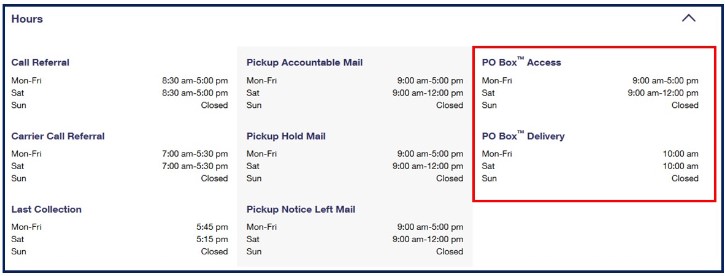
PO Boxes are generally located in the lobby area of the Post Office. Select Post Offices have extended business hours and/or 24-hour lobby access.
- Lobby hours are the hours when you may access your PO Box. Many Post Office lobbies are open 24 hours per day, 7 days per week, so be sure to check the lobby hours when selecting a PO Box online.
- Business hours are the hours when Post Office employees are available to answer questions and to conduct transactions (PO Boxes, mailing, shipping, purchase stamps, etc.). To present your IDs and pick up your keys or lock combination, you need to visit the Post Office during business hours.
- For more information on your PO Box lobby hours, please go to https://www.usps.com/manage/po-boxes.htm.
How do I find the PO Box Access Hours for my local Post Office™?
Benefits of PO Box service:
- You get your mail when and where you want it.
- You can search online for a PO Box at a location that's convenient for you.
- There are several ways that you can renew a PO Box:
- Online with a credit or debit card.
- At any self-service kiosk.
- By mail with a check or money order.
- In person at the Post Office™.
- Mail typically arrives faster at a PO Box than at a residential or business address.
- Your PO Box address can be used for selected contacts and transactions.
- PO Boxes are affordable.
- PO Boxes are good for businesses expanding to other cities.
- Additional services available at some Post Office locations include Street Addressing and Signature on File. See https://www.usps.com/manage/po-boxes.htm for more information and availability.
How do I find the availability and prices of PO Boxes online?
Available PO Boxes can be found online or at your Local Post Office. To find a PO Box online:
- Go to https://www.usps.com/manage/po-boxes.htm.
- Enter a valid street address, city, and state or a ZIP Code™ to find a PO Box at a location that's convenient for you.
- Click 'Search' and select a Post Office location from the list or map, and then a box size and payment period. The search results include:
- If parking is available
- Lobby hours (when you can access your PO Box)
- Business hours or 24 hour locations
- The street address of the Post Office
- Pricing, fees, and available box sizes at each Post Office
How do I get technical help with PO Boxes Online?
For assistance with PO Boxes Online, please visit Customer Service at Help - USPS or email the Internet Customer Care Center at Email Us, click on "USPS.com" and select from the topics.

How do I apply for a PO Box™?
Applying for a PO Box
You may apply for a PO Box in person at a Post Office™ or online at USPS.com®. An application process for PO Box service is not completely approved until your identity and current permanent physical address where you reside or conduct business is verified.
There is only one (1) official (primary) box holder for a PO Box. This box holder may permit others to also use the box.
- Spouses may complete and sign one PS Form 1093, Application for Post Office Box. All applicants listed (including both spouses and other individuals listed, except for minors) must present two forms of acceptable identification. One must be an acceptable primary of identification and the other an acceptable secondary form of identification. A parent or guardian may receive delivery of a minor's mail by listing the name(s) of each minor on PS Form 1093.
- Other adult persons who receive mail in the PO Box of an individual box customer must be listed on PS Form 1093 and must present two forms of acceptable identification.
- Employees or members who receive mail in the PO Box of an organization who is a box customer must be listed on PS Form 1093. Each person must have verifiable identification and, upon request, present this identification to the United States Postal Service®.
Important: Only the official box holder may file a Change of Address (COA) order with USPS to close mail (temporarily or permanently) away from a PO Box, except residential customers who are eligible for a Group E (no-fee) box.
When any information required on PS Form 1093 changes, the primary box holder must update the application file at the local Post Office facility.
How do I apply for a PO Box in person?
To apply at a Post Office, you must complete all required information on PS Form 1093, Application for Post Office Box Service (to view and print the form, click here). If you apply online, this form is generated during the application process. Bring a copy of the completed form along with two forms of acceptable U.S. identification (one must be an acceptable primary of identification and the other an acceptable secondary form of identification) for verification to a Post Office that provides window service. See Acceptable Forms of Identification.
The Post Office need not be the one where box service is desired. Please note that furnishing false information on the application or refusing to furnish required information is sufficient reason for denial of the application or discontinuance of service.
How do I apply for a PO Box online?
Go to PO Boxes Online
- Search for an available PO Box by entering an address or a ZIP Code™ under Reserve a New PO Box. Choose an available PO Box location by clicking on the location in the list or map.
- From there, choose an available PO Box size, indicating a 3-month, 6-month, or 12-month payment preference and click 'Continue.' If the box size is not available, you will be added to the wait list.
- Complete the PO Box Online Application (PS Form 1093) on Step 2: Reserve a New PO Box and agree to the Terms & Conditions to proceed to enter payment information.
- Select your payment method and enter your card information. If you wish to save the card, click in the box to the left of 'Save Credit Card to My Account.' You are allowed to save three cards to your account.
- Next, read the refund policy and, if you accept the refund policy, click on the box to the left of 'I accept the refund policy' and click 'Continue.'
- Review the Application and Payment Review page for accuracy. Submit your application.
- Once the PO Box application has been submitted, customers can view a confirmation page with a summary of their order details along with detailed instructions how to activate their PO Box.
- Customers then have 30 days to bring their printed PS Form 1093 and two forms of acceptable U.S. identification (see Acceptable Forms of Identification).
- Customers that are eligible for a Free Group E PO Box should not apply for a PO Box online. These customers should visit their local Post Office to complete their application.
I am a business customer. What do I need to bring to the Post Office™?
You need to apply for a PO Box like any other customer. The ID requirements are the same as those for residential and business customers. (See Acceptable Forms of Identification)
Is there an age requirement to apply for a PO Box online?
You must be 18 years or older to apply online for a PO Box. However, minors may not apply for a PO Box online. If you are under 18 years of age and want a PO Box, you may apply at a Post Office. See Applying for a PO Box. PO Box service may be provided to a minor (a person under 18 years of age) unless the minor's parent or guardian submits a written objection to the appropriate postmaster.
Can I apply for a PO Box in another ZIP Code™?
Yes, you can apply for a PO Box at a Post Office that is most convenient to your home or business. The Post Office geographically closest to you may not be in your ZIP Code.
How do I apply for a PO Box when moving to a different city or state?
If you are moving to another location, you may apply for a PO Box online or in person. In either case, to begin the verification process, you need to go to a Post Office where you currently live with a copy of your application and two acceptable forms of U.S. ID. The Postal Service™ has 3 days to verify your information. Once your information has been verified, an employee at the Post Office™ will call you to continue the application process. After you move, you will need to complete the verification process at your new address.
How do I get keys or the lock combination to my PO Box?
You will receive two keys (or a lock combination) for your PO Box at the Post Office where your box is located—after you have paid the applicable fee, submitted a completed PO Box application (PS Form 1093) and your two forms of acceptable U.S. ID are verified. If you need more keys, you may request and pay an additional fee for each key at the Post Office where your PO Box is located.
What is the Wait List?
If your preferred PO Box size is not immediately available, you may choose another box size, find a PO Box at a different location, or request to be added to the Wait List (online or at a Post Office). If you request to be added to the Wait List, your name will be placed on a waiting list for that box size at the Post Office you have requested.
How will I be notified when a PO Box is available if I am on the Wait List?
The Post Office will contact you by phone or by email to let you know that a box is available. You should respond promptly as there may be other customers on the wait list for the same box size. Be sure to take your completed application (PS Form 1093) and two forms of acceptable U.S. identification with you to the Post Office and check to make sure the information on the form is correct. If you applied online, an email will be sent to you notifying you when your box is available off the waitlist. You have two days to complete the payment online for this box. Then, you have 30 days to print the 1093, available from the "Manage Your Account" page, and bring it into the office, along with two forms of acceptable U.S. identification. One form of ID must contain a photograph. Your valid photo ID must be current, contain sufficient information to confirm that you are who you claim to be, contain your current address, and be traceable to you. For more information on acceptable forms of identification, see Acceptable Forms of Identification.
Can I remove my name from the Wait List?
Yes, you may remove your name from the Wait List. Either contact the Post Office or, if you applied online, go to the Manage Your Account page, select the box that you have on the wait list, and click 'Remove from wait list.'
How do I edit the information on my PO Box application (PS Form 1093)?
- When you are applying for a new PO Box, be sure to review all the information on the application form carefully and make sure it is accurate (online or on paper).
- If you have already submitted your online application or are using your PO Box, you must complete an updated PS Form 1093, Application for Post Office Box Service, at the Post Office where your PO Box is located.
How can I qualify for a free PO Box?
You may qualify for free (Group E) PO Box service if your physical / business location meets all of the following criteria:
- The physical / business location is within the geographic delivery boundaries administered by a Post Office.
- The physical / business location constitutes a potential letter carrier delivery point of service.
- The United States Postal Service® chooses not to provide letter carrier delivery to the physical / business location.
- The customer does not receive letter carrier delivery via an out-of-bounds delivery receptacle.
If you believe you meet all of these requirements, do not reserve a PO Box using the Post Office Boxes Online application. In these instances, please contact your local Post Office facility.
Is my personal information stored online kept private and secure?
Yes. To ensure that your personal information is confidential, the US Postal Service® uses industry-standard encryption software. Your data is sent over a secure connection between your computer and the USPS. Once received, your personal information is stored in a password-protected database that is accessible only by authorized USPS personnel.
PO Box™ Privacy Act Statement
Your information will be used to provide PO Box service. Collection is authorized by 39 U.S.C. 401, 403, & 404.
Providing the information is voluntary, but if not provided, we will be unable to fulfill your request for PO Box service. We do not disclose your information to third parties without your consent, except to facilitate the transaction, to act on your behalf or request, or as legally required. This includes the following limited circumstances: to a congressional office on your behalf; to financial entities regarding financial transaction issues; to a U.S. Postal Service auditor; to entities, including law enforcement, as required by law or in legal proceedings; to contractors and other entities aiding us to fulfill the service (service providers); to process servers; to domestic government agencies if needed as part of their duties; and to a foreign government agency for violations and alleged violations of law. Information concerning an individual box holder who has filed a protective court order with the postmaster will not be disclosed except pursuant to court order.
For more information regarding our privacy policies visit http://about.usps.com/who-we-are/privacy-policy/welcome.htm.
How do I manage my PO Box™ account?
How do I manage my PO Box account online?
To manage your PO Box account online, either sign up for an USPS.com account or sign in to your USPS.com account. From the PO Box landing page (https://www.usps.com/manage/po-boxes.htm) you can:
- Search and Reserve a New PO Box (apply online for another PO Box)
- Set up your PO Box online account by clicking "Manage Account"
- Add an existing open PO box to your account by clicking "Link" (closed PO Boxes cannot be linked)
- Renew a current PO Box you are managing online
- Select Manage Account to sign in and view all the PO Boxes you are managing online
How many PO Boxes can I manage online?
Currently, customers can manage as many PO Boxes as they would like online. For additional boxes or to upgrade to Caller Service, please visit your local Post Office.
How do I edit my online registration information?
To edit your registration information, sign in to your USPS.com® account and click "My Profile" from the header. You can edit your personal information, preferences, and saved payment information.
How do I pay for my PO Box™?
What are PO Box fees and which can I pay online?
When applying online for a new PO Box, you select a three-month, six-month, or 12-month payment period. Your rental fee, plus a refundable key deposit (for the two keys provided) are billed to your credit or debit card. Prices vary according to the size of the box and in which Post Office™ facility your box is located in. For a complete breakdown of our pricing, you can learn more by clicking here.
When renewing a PO Box, you may also select a three month, six-month, or 12-month payment period for the upcoming period.
If the Postal Service does not deliver to your home address, you may be eligible for a Free Group E PO Box. If this is the case, you should not apply for a PO Box online, and should visit your local Post Office to complete your application.
What are my options for paying PO Box fees?
Your options for making a payment are:
- Pay online:
- Go to https://www.usps.com/manage/po-boxes.htm and click "Renew." This will direct you to a page where you can Sign In if you already have an account, or Register if you do not.
- If you already have an account on USPS.com, enter your Username and Password.
- If you do not have an account on USPS.com, click 'Sign Up Now' (it's free). Once you create your account, you will be redirected back to PO Boxes online.
- If you have never linked your PO Box to your online account, click "Link." Enter in your box information exactly as it was on your application to link your box to your online account. You can set up automatic renewal or pay one time for this box if you are 30 days before your next due date.
- If you are already managing your box online, on your Manage Your Account page:
- Click "Renew Now" next to the box you'd like to pay for
- Review your information
- Enter your billing information, and then submit
- Pay at a Self-Service Kiosk:
- Pay by mail:
- Send a check or money order payable to "U.S. Postal Service" to the Postmaster where your PO Box is located.
- Pay in person:
- Visit the Post Office where your PO Box is located using cash, credit or debit card, check or money order payable to "U.S. Postal Service" or "Postmaster".
Notes:
- If we have not received your payment by the 10th day after the due date, your PO Box service will be terminated and all incoming mail will be returned to senders. To reopen your box, you would need to pay in person and, in addition to any unpaid box fees, you may be assessed a lock change or handling fee. To avoid this inconvenience and this extra cost, we encourage you to renew on time.
- If you have signed up for a 3-month payment period, you must enroll in automatic renewal. Your card will be charged every 3 months automatically.
What credit cards and other payment options are accepted for payment of a PO Box?
- American Express
- Discover
- MasterCard
- VISA
- Apple Pay
How many credit or debit cards am I able to store online?
Up to three credit or debit cards may be saved in your PO Box account. Your saved cards are conveniently available for Click-N-Ship® and The Postal Store™ purchases.
Can I use a credit card with an international billing address for PO Box fees?
No. Credit cards with international billing addresses are not currently supported online.
How do I edit a card linked to an automatic renewal?
Sign in to your PO Box account by clicking "Manage Account" from the landing page. From your Manage Your Account page, click "See Details" for the box that you'd like to edit automatic payment for. Then click "Edit Payment Info" and "Use a Different Card" to edit your card information.
Will I be notified when my PO Box service fees are due?
Yes:
- Physical reminders: If you did not apply for PO Box service online, you may receive Notice 32-B PO Box Fee Due or Notice 32-C PO Box Fee Due in your box advising you of renewal 20 calendar days before the fee is due.
- If you are temporarily out of town and have filed a temporary forwarding order, the notice is forwarded to that address.
- Email notifications / reminders: If you provided your email address when applying on PS Form 1093 or updated your application file and form with your email address at the local Post Office facility, you will receive email notifications at least 10 days prior to the actual credit card charge. The timing and messaging of these emails vary depending on how you provided your email address.
Please note that whether or not you received a reminder or notification that payment is due, it is your responsibility to pay the fee by the due date.
How do I view my previous online payments?
To view the past three years of your online payment transactions, click "Manage Account" from the PO Box Landing page to get to your Manage Your Account page. From there, click "See Details" for the box that you'd like to view history for. The transaction history will appear at the bottom of the page.
How do I renew a PO Box?
PO Box renewal
Your payment options for renewing your PO Box are exactly the same as paying for a new PO Box.
What is Automatic Renewal?
You can set up automatic renewal payments online to pay your annual or semi-annual PO Box fees automatically on the due date using the credit or debit card of your choice. To set up automatic payments, you must use a saved credit or debit card. If you have not saved a card, you can add one to your account.
What happens if my PO Box renewal fee is late?
If your renewal fee is late, your box will be closed and you will not be able to retrieve your mail. If your payment is more than 10 days late, you need to go to the Post Office where your PO Box is located to pay your renewal fee and a handling fee to cover our processing costs. You will not be able to pay online or at a self-service kiosk. After 10 days of nonpayment, your mail is treated as undeliverable mail and your PO Box is closed. Closed boxes may be made available for new customers.
Notes:
- If payment is not received by the 10th day after the due date (a $30.00 fee is charged for late payments), PO Box service is terminated, incoming mail will be returned to the sender, and, in addition to any unpaid monthly PO Box fees, the customer will be charged a handling fee to reopen the box.
- The online system is available to receive payments for PO Boxes that are past due up to the 10th day after the due date.
- Box fees are due either on the 15th or the last day of the month (depending on what billing cycle the customer is on). Boxes that have already been added to an account have the 10 day grace period to pay their renewal fees online. Existing PO boxes may be added (linked) to an online account as long as the box is still open (including during the 10 day grace period).
How do I renew my PO Box?
You have four options for renewing your PO Box:
- Online with a credit or debit card
Go to https://www.usps.com/manage/po-boxes.htm and click 'Renew' which will take you to the 'Manage Your Account' page. Then click Renew PO Box. This feature is available 30 days before your next payment is due.
- At a Self-Service Kiosk
Go to: USPS.com® - Find Locations -- select Self-Service Kiosks from the drop-down menu.
- At the Post Office where your box is located
Note: If your payment is more than 10 days late, this is your only option for renewing your PO Box.
- Renew by mail
Send a check or money order payable to "U.S. Postal Service" to the Postmaster where the PO Box is located. Address the mailpiece to:
-
Postmaster
Name of the City, State, ZIP Code
Does USPS design its systems to maintain my credit or debit card information securely?
Yes. Your information is protected using powerful Secure Socket Layer (SSL) 128-bit encryption technology.
I already have a PO Box. How do I renew it online?
To renew your PO Box online, navigate to https://www.usps.com/manage/po-boxes.htm and select "Renew". After signing into your USPS.com account, you will be directed to the Manage Your Account page. Find the PO Box you want to make a payment on, and make your payment.
How do I close a PO Box?
There are two ways you can request to close a PO Box:
- If you manage your PO Box online, you can close it by visiting PO Boxes Online at http://www.usps.com/manage/po-boxes.htm.
- If you manage your PO Box at a local Post Office, you must close your PO Box at the Post Office facility where your box is located.
To determine if your box is eligible for a refund, see Refunds for PO Box rental fees.
Why was my PO Box closed?
A PO Box may be closed if fees have not been paid by the due date. After the fees have become past due, access to the box is blocked. The boxholder has 10 days to pay past due fees and pickup held mail. After that ten days (ten days after the due date), the box is closed and your mail is returned as undeliverable.
A PO Box may also be closed if the official box holder has:
- Falsified the application for the box
- Physically abused the box
- Violated any regulation on the care or use of the box (including continuous overflow mail)
- Neglected to pick up his/her mail and the box is overflowing
Can a PO Box be transferred?
PO Box service may be transferred, without payment of an additional fee, to any box of the same size and fee group at the same facility or a different facility as long as the PO Boxes have the same 5-digit ZIP Code. The customer will have to locate and rent the box they want.
To transfer service, submit a new application either to the facility where service is currently provided or to the facility where service is desired.
- PO Box service may be transferred no more than once in any semiannual payment period.
- PS Form 3575 must be completed and submitted when transferred.
- Customers must contact their local Post Office with specific questions (including whether or not a nearby office with a desired PO Box location has the same ZIP Code).
If you want PO Box service at a location where you can't transfer to, you will need to close your current PO Box service and start service at that new location.
Death of a PO Box holder
If a box customer dies or disappears before the end of the period for which the box is issued the following options are available:
- As a temporary measure to retain mailing services to the PO Box, another person listed on the box, an appointed executor, or administrator for a deceased person may file a temporary change of address.
- If another person listed on the PS Form 1093 would like to become the permanent PO Box customer, they will need to file a new PS Form 1093 and present the Required ID before becoming the new primary box holder.
What do I need to know about PO Box™ delivery?
General guidelines
Private shipping companies or carriers, such as UPS, FedEx and Amazon, are not able to deliver to (place mail in) a PO Box. Only the United States Postal Service® is permitted to deliver mail to a PO Box.
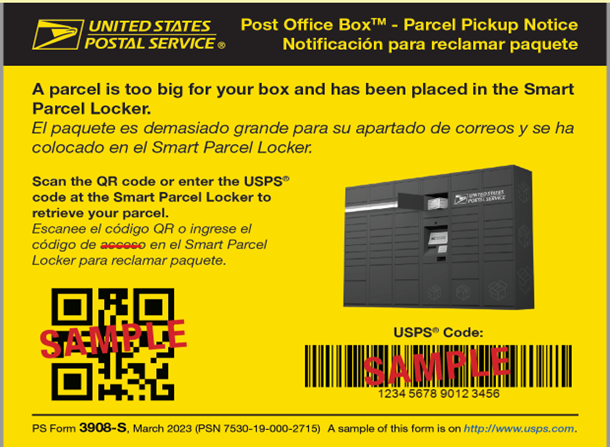
If a mailpiece that is addressed to a PO Box must be signed for, or is too large to fit in the box, the Post Office™ will place one of the following in your box:
- A key to a larger storage locker within the same facility
- A notice that you can take to a window clerk to collect your item(s) – Redelivery is not permitted since you have to collect the item from a window clerk.
- The yellow-orange PS Form 3908-S with a QR Code and USPS Code – A USPS Smart Locker located at the same post office as your PO Box contains your oversized package. Either scan the QR Code or enter the USPS code at the Smart Locker display to open the locker containing your package. More information on Smart Lockers is available.
To learn more about Recipient Services (such as Post Office Box Services) provided by the United States Post Office®, please visit the Domestic Mail Manual (DMM), section 508.4.0.
There is no mail delivery where I live. Can I apply for a PO Box online?
You can search for an available PO Box online, but you need to apply for a PO Box at a Post Office and determine whether you qualify for a no-fee PO Box.
Can I send domestic Priority Mail Express® to a PO Box?
Domestic Priority Mail Express may be sent to a PO Box. If the mailer sending a Priority Mail Express item instructs USPS to obtain a signature from the addressee upon delivery of the item, USPS will leave a delivery notice inside the PO Box that the customer must sign for the item. Otherwise, USPS will leave the Priority Mail Express item in the PO Box if it fits. If it does not fit, USPS will leave a notice inside the PO Box.
Can all USPS mail classes be delivered to a PO Box?
Yes, USPS mail and packages of all classes and services can be addressed to and delivered to a PO Box. If a mailpiece must be signed for or is too large to fit in the box, a retail associate will place a key, notice or form as described in the General Guidelines section above with further instructions for picking up your item.
What are the PO Box™ forwarding guidelines and restrictions?
Mail may be forwarded online from one PO Box to another PO Box or to a street address or by submitting a PS Form 3575, Change of Address Order. For information, visit our FAQ - Change of Address - The Basics.
Forwarding of mail for other persons receiving mail at the box is the responsibility of the official box holder.
- Submitting a "permanent" Change of Address (COA) request will automatically close the PO Box permanently (except residential Group E boxes).
- Turning in a "temporary" COA will not close the PO Box. A temporary COA forwards mail for 6-month intervals, not to exceed 1 year.
- Mail that is in a PO Box when a COA is filed is forwarded to the new address (either permanent or temporary).
Change of Address orders may be filed as follows:
- Residential Customers
Only the box customer listed on Form 1093 may file change of address orders. - Organizations
Only the box holder customer or authorized representative of the organization listed on PS Form 1093, Application for Post Office Box may file Change of Address (COA) orders.
- Note: Forwarding of mail for other persons is the responsibility of the organization.
- Group E residential boxes only
The box customer or any other persons listed on the PS Form 1093 may file an individual change of address order. Only the official box holder may file a change of address order for entire family.
The official box holder of a PO Box may manually forward mail received at the PO Box (but intended for someone else) by:
- Crossing out the old address.
- Writing the new address on the mail item.
- Important: Only the address can be updated. The recipient's name must remain the same.
A PO Box may not be used primarily for the purpose of forwarding mail on to a different address.
Mail sent to a PO Box that is closed but has no COA request on file will be handled in the following ways:
- A postal clerk may file a COA on the box holder's behalf. Please contact the local Post Office facility where the box is located.
- Mail will be held in General Delivery until a COA is on file.
- Mail will not be returned to sender until the PO Box is declared vacant, except for Registered Mail®, Certified Mail®, Insured Mail, COD Mail, Signature Confirmation™ Services Mail, postage-due mail, and perishable mail items.
Notes:
- If you have additional questions regarding the forwarding of mail from your PO Box to another address, please contact your local Post Office.
- You may apply for a PO Box in a city/state other than the one in which you live, subject to availability and verification of identity and current physical address.
- After applying online or in person, you may go into any Post Office to complete the ID verification process. You will STILL need to pick up your keys or lock combination at the Post Office where you rented your PO Box. For this reason, the Postal Service recommends completing the ID verification and key/combination pickup processes at the same time.
- Customers that submit a Change of Address online or in person for a PO Box must inquire about refund eligibility at the post office where their PO Box is located. Refunds for eligible boxes closed due to Change of Address are not granted without an in person or written request.
Refunding PO Box Rental Fees
Managed In-Person
Your PO Box™ is prepaid in advance for a three, six or twelve-month service period. If you decide to close your PO Box, you may be eligible for a refund according to the following guidelines:
|
PO Box Refund Policy – INACTIVE PO BOXES
(Managed In-Person; Applied, but never picked up keys or lock combination)
|
|---|
For 3, 6, and 12 month boxes never activated:
- Customers will receive an automatic full refund after 30 days of inactivity.
- If customers reserved the PO Box online, customers will receive an automatic full refund after 30 days of inactivity.
- Please note: automatic box closure and refunds due to inactivity will only apply to PO Boxes that were reserved online after the 6/25/2017 POBOL launch.
|
|
PO Box Refund Policy – ACTIVE PO BOXES
(Managed In-Person; Applied and picked up keys or lock combination)
|
|
Refund Requested
|
3 Month Rental Term
|
6 Month Rental Term
|
12 Month Rental Term
|
|
Eligibility
|
Not eligible for a refund once activated, but can still be closed online.
|
Customers can request a partial refund for active 6 or 12 month boxes online.
|
|
Between Months 1 and 3
|
--
|
Within the first three months, 50% of the payment is refunded.
|
Within the first three months, 75% of the payment is refunded.
|
|
Between Months 4 and 6
|
--
|
After the beginning of the fourth month, none of the payment is refunded.
|
During months four through six, 50% of the payment is refunded.
|
|
Between Months 7 and 9
|
--
| -- |
During months seven through nine, 25% of the payment is refunded.
|
|
Between Months 10 and 12
|
--
| -- |
After the beginning of the 10th month, none of the payment is refunded.
|
Managed Online
Your PO Box™ is prepaid in advance for a three, six or twelve-month service period. If you decide to close your PO Box, you may be eligible for a refund according to the following guidelines. To apply for a refund, go to http://www.usps.com/manage/po-boxes.htm.
|
PO Box Refund Policy – INACTIVE PO BOXES
(Managed Online; Applied, but never picked up keys or lock combination)
|
|---|
|
For 3, 6, and 12 month boxes never activated:
- Customers will receive an automatic full refund after 30 days of inactivity.
- If customers reserved the PO Box online, customers will receive an automatic full refund after 30 days of inactivity.
- Please note: automatic box closure and refunds due to inactivity will only apply to PO Boxes that were reserved online after the 6/25/2017 POBOL launch.
|
|
PO Box Refund Policy – ACTIVE PO BOXES
(Managed Online; Applied and picked up keys or lock combination)
|
|---|
|
Refund Requested
|
3 Month Rental Term
|
6 Month Rental Term
|
12 Month Rental Term
|
|---|
|
Eligibility
|
Not eligible for a refund once activated, but can still be closed online.
To close online, go to http://www.usps.com/manage/po-boxes.htm.
|
Customers can request a partial refund for active 6 or 12 month boxes online.
To apply for a refund, go to http://www.usps.com/manage/po-boxes.htm.
|
|
Between Months 1 and 3
|
--
|
Within the first three months, 50% of the payment is refunded.
|
Within the first three months, 75% of the payment is refunded.
|
|
Between Months 4 and 6
|
--
|
After the beginning of the fourth month, none of the payment is refunded.
|
During months four through six, 50% of the payment is refunded.
|
|
Between Months 7 and 9
|
--
|
--
|
During months seven through nine, 25% of the payment is refunded.
|
|
Between Months 10 and 12
|
--
|
--
|
After the beginning of the 10th month, none of the payment is refunded.
|
How do I request a refund for PO Box fees?
- If you are managing your PO Box online:
- Visit PO Boxes Online at https://www.usps.com/manage/po-boxes.htm. After you have signed into your account, find your box on the Manage Your Account page and select the link to "Close / Request a Refund".
- If you have not completed the verification process within 30 days of your online application, you may also request a refund online.
- If you require technical support for the PO Box Online application, contact the Technical Support team by email at Email Us (click on "USPS.com" and select from the topics) or by phone at 1-800-344-7779.
- If you are managing your PO Box at a local Post Office:
- If you started using your PO Box, you must request a refund at the Post Office facility where your box is located.
Canceling automatic payments
- If you signed up for automatic payment renewal online, you can cancel automatic payments online up to the 15th of the month prior to the due date for your PO Box.
- After the 15th, you will not be able to cancel automatic payment online.
- Automatic payments for 3-month boxes CANNOT be canceled.


